Overview
This page allows the management of the tracking devices, monitoring their movement, speed, connection status, GPS position, battery level and any possible status the device might be in. It also makes it possible to customize the Map2D icons with colored frames and activate the auto/request position option.
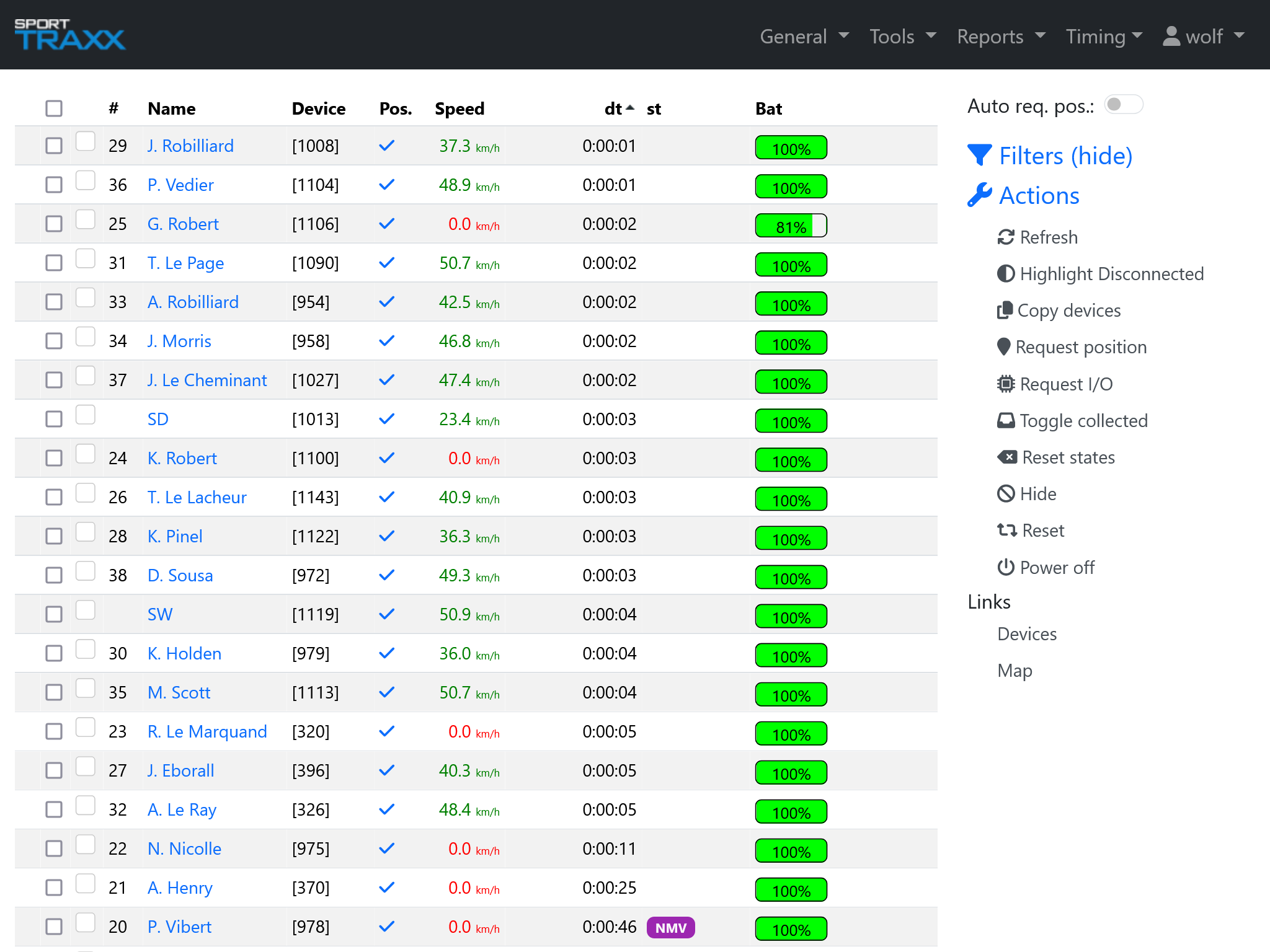
Table
- GPRS Connection status (upon request, using the function Highlight Disconnected in the right sidebar)
- Checkbox to select the competitor
- Colorbox to change the color of the frame of the competitor's icon on the Map2D page
- # race number assigned to the competitor
- Name: competitor’s name
- Device: (main) tracking device ID assigned to the competitor
- Pos.: position validity (✓ or X)
- Speed: current speed of the tracker
- dt: time since the last transmitted position
- st: status of the tracker
- Bat: level of the tracking device's battery (additional battery boxes are related to aliases)
Device statuses
- off The device has been turned off manually or remotely.
- Sporttraxx has collected the device.
- SOS The competitor sent a MEDICAL SOS alarm.
- SOS_FIRE The competitor sent a Fire SOS alarm.
- ROAD BLOCKED The competitor sent a ROAD BLOCK/HAZARD alarm.
- CRASH a Crash has been detected via the accelerometer.
- OK The competitor sent an OK message.
- NMV The tracker does not detect any movement.
- redflag:sent Redflag sent.
- redflag:recv Redflag received.
- redflag:ack Redflag acknowledged.
- out The competitor has retired.
- lowbat The battery level is critically low.
Each column can be sorted by clicking on its name on the top.
If alias trackers are used, an additional battery column will be automatically displayed.
The overview page will automatically be filled with lines and competitor’s details, as soon as they connect to GPRS for the first time.
Lines shown in faded grey are vehicles put in NON_PUBLIC mode in the Map2D page, in order to keep them not visible on the map.
When moving the cursor on the Pos. cell, the actual coordinates of the last transmission are shown and the tracker's IMEI. By clicking on it, a link to Google Maps will be opened and the GPS coordinates will be available in 2 more formats.
Right sidebar
Auto req.pos. button
If activated, the browser will send a request position command to all trackers once every 4 minutes.
Note: this option could significantly affect the battery duration of the trackers, forcing them to transmit even if they are stationary or in sleep mode. Use carefully
Filters
Hide devices in the table according to their status.
Actions
- Refresh: manual refresh of the table. Does not affect the sorted sequence in the columns
- Highlight Disconnected: shows GPRS connection status by means of a green/red dot in the very first column
- Copy devices: copies selected device(s) IDs in the computer's clipboard. For external softwares
- Request position: sends a position request to a selected device(s)
- Request I/O: sends a request of status of connected accessories
- Toggle collected: assigns a collected status to the selected device
- Reset states: resets the status(es) of the selected device. To be used carefully.
- Hide: hides the selected device from the list and in the Map2D page until its next transmission (if any). Hidden status can be cancelled in the map link, if a transmission is missing.
- Reset: sends a GSM + GPS reset to the selected device
- Power off: turns off the selected device. Note: if turned off, the device cannot be reached again
Commands sent through this link are mainly addressed to the main device (for aliases use the Overview2)